


ASRock
B650 Pro RS
25.327TL


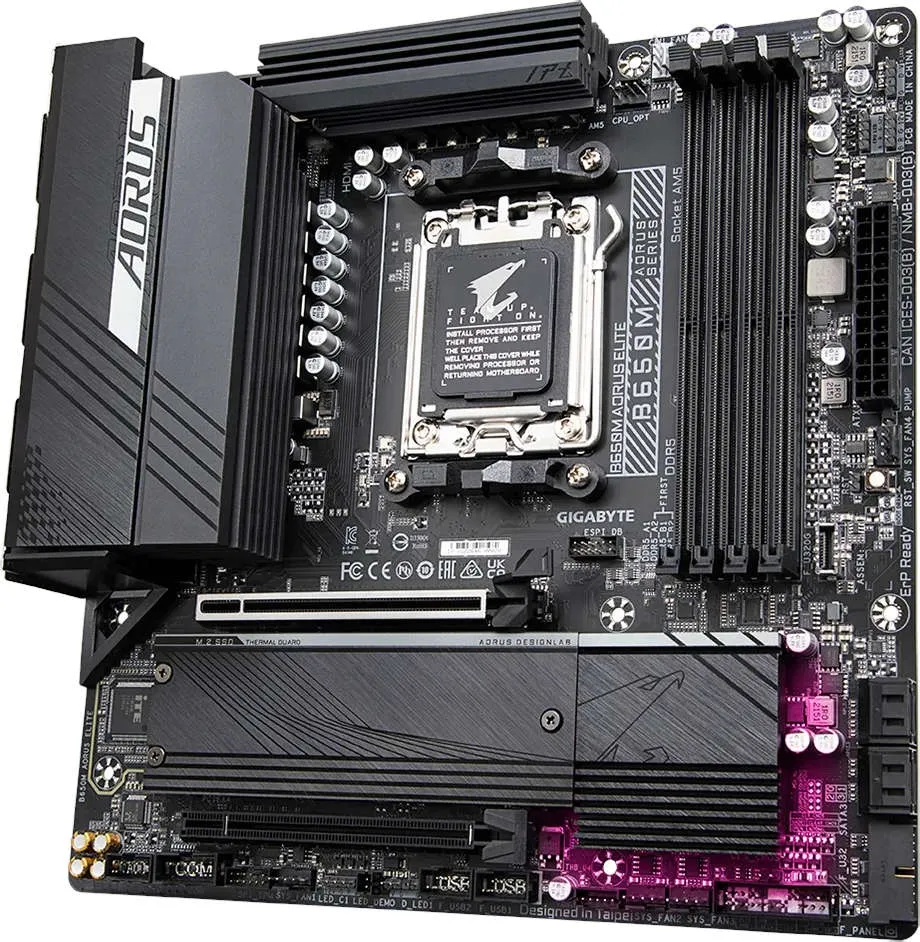

Model kodu: B650MAORUS · Anakart

Twin 12+2+1 Digital VRM Design
* Power Stage maximum current capacity is based on VCORE Phase.
Fully Covered MOSFET Heatsinks
6mm Heatpipe
7 W/mk Thermal Conductivity Pad
Design Ready for PCI Express 5.0
1* PCIe 5.0 x4 M.2 + 1* PCIe 4.0 x4 M.2 with M.2 Thermal Guard
1*PCIe 4.0 x16 with Ultra Durable™ Armor
Socket AM5 Supports AMD Ryzen™ Series Processors
6: Dual Channel SMD DDR5 Memory
8 Solid Pin CPU Power Connector
Reset/RGB Switch/Direct to BIOS/Safe Mode
GIGABYTE Add-in Card Connector
Wi-Fi 6E 802.11ax 2T2R & BT 5.2 with AORUS Antenna
11: Front USB 3.2 Gen 2x2 Type-C®
With the fast-moving technology changes, GIGABYTE always follows the latest trends and provides customers with advanced features and latest technologies. GIGABYTE motherboards are equipped with upgraded power solution, latest storage standards and outstanding connectivity to enable optimized performance for gaming.
To ensure maximum Turbo Boost and overclocking performance of AMD's new generation CPU, GIGABYTE AORUS series motherboard equip the best VRM design ever built with the highest quality components.
To unleash full potential of multi-cores CPU performance
For CPU integrated GPU performance and memory control
Provide stable power for CPU featured PCIe lanes
Ultra Durable™ SMD PCIe 5.0 x4 M.2 Connector
The first PCIe 5.0 x4 M.2 Slot supports the latest M.2 25110 form factor. It doubles the bandwidth of PCIe 4.0 and ensures that compatible with cutting-edge M.2 SSDs released in next few years.
DDR5 EXPO & XMP Overclocking Up to 8000 and Beyond*
AORUS is offering a tested and proven platform that the memory overclocking capability is able up to 8000 and beyond. All users need to do for achieving this extreme memory performance boost is to ensure that their DDR5 memory modules are AMD EXPO™/ Intel® XMP capable, the EXPO/XMP function is activated and enabled on their AORUS motherboard.
How to Boost EXPO DDR5 Performance on AM5 Platform?
* Memory overlocking capability and EXPO/XMP profiles support may vary depending on hardware configuration and memory modules.
Please see the complete validated memory support list.
Product features may vary by model.
DDR4 voltage is managed by MB with wide range
MB provides fixed 5V to Native DDR5 memory and built-in PMIC outputs locked 1.1v to memory
IC.
GIGABYTE Exclusive DDR5 Circuit Design
GIGABYTE’s exclusive design unlocks Native DDR5 PMIC secure mode into programmable mode and
control
Native DDR5 voltage with wide range.
• GIGABYTE exclusive circuit design unlocks Native DDR5 voltage control
• Transforms Native DDR5 memory module to Overclocked DDR5 memory
• Increases DDR5 memory overclocking performance and capability
• Supports all PMIC vendors for maximum compatibility
* Memory overclocking capabiblity will vary based on users' hardware configuration
All memory routing is under the PCB inner layer shielded by a large ground layer to protect
from
external interference.
Note: The picture is for reference and may vary by model.
GIGABYTE AM5 MB supports both AMD EXPO™ and Intel® XMP overclocking memory modules for maximal compatibility. MB will automatically detect both profiles format in SPD, users can choose to enable one of profiles from BIOS menu and easily reach overclocked memory performance.
Automatically Boost the Native DDR5 frequency to 5000MHz while the system is under heavy loading by a single click.
AMD EXPO™ and Intel® XMP 3.0 User Profile
Define and create your own SPD profile into Native, EXPO and XMP 3.0 memory modules. One user-defined profile can be saved, loaded either locally or from/to an external storage device.
• One empty SPD profile can be defined by users and carry to next computer
• Quick memory performance simulation based on user input clock and timing parameters
• Profile save and load function to share your memory parameters online
SPD Re-defined or
retrieve from database
Note: The Active OC Tuner feature is available on certain models. Product feature may vary by model.
GIGABYTE Motherboards' unparalleled performance is guaranteed by innovative and optimized thermal design to ensure the best CPU, Chipset, SSD stability and low temperatures under full load application and gaming performance.
1. Fully Covered Thermal Design
• Real One-piece Build
TMOS is a TRUE single piece heatsink. Its one-piece design and larger surface drastically improve the cooling performance against competitors' multi-piece design.
• 4X Large Surface
Increased surface area up to 4X larger compared to traditional heatsinks. It improves heat dissipation from the MOSFETs.
• Multi-Cut Design
Both TMOS & RMOS heatsinks with multiple channels and inlets featured which lead the air flow going through more efficiently and cause a great improvement of heat transfer performance.
The M.2 Thermal Guard prevents throttling and bottlenecks from high speed M.2 SSDs as it helps to dissipate heat before it becomes an issue.
2X COPPER PCBs design effectively lower the component temperature by its high thermal conductivity and low impedance.
GIGABYTE Ultra-Efficient M.2 Thermal Guard
Thermal Throttling As Temperature Rises
3% Cooler by implementing
2X copper PCB Design
By adopting 2X copper on PCB inner layer, it lowers the components' temperature at least 3%
by
turning the PCB into a super thin PCB size copper heatsink to dissipate the heat from the
components effectively, due to it’s high thermal conductivity and lower impedance.
Smart Fan 6 contains several unique cooling features that ensure gaming PC maintain its performance while staying cool and quiet. Multiple fan headers can support PWM/DC fan and pump, and users can easily define each fan curve based on different temperature sensors across the board via intuitive user interface.
High Current Support
Each fan headers support PWM and DC fan and Water Cooling Pump , and up to 24W (12V x 2A) with Over-Current Protection
Precision Control
Multiple temperature/fan speed control points for precise fan curve
Dual Curve Mode
Slope/Stair dual mode for different user scenario
Fan Stop
Fan can stop completely below users' specified temperature point
We increase control points from 5 to 7 and larger fan speed graph for
precise
and easier fan curve
control.
Fan curve can be quickly switch with Slope and Stair modes for different
user
scenario. Slope is
traditional and
intuitive linear fan speed curve. With newly added Stair non-linear
mode, fan
keeps at same speed
between specified
temperature interval.
For advanced users, we provide fan speed manual input for more precise
control.
Use can place 4 EZ Tuning points at rough temperature/fan speed, and
Smart Fan 6
can quickly generate a
fan curve.
Fan curve profile can be saved in BIOS ROM, profile will be kept after
updating
BIOS.
GIGABYTE Motherboards enable the ultimate connection experience with blazing data-transfer speeds through the next generation network, storage, and Wi-Fi connectivity.
The latest Wireless solution 802.11ax Wi-Fi 6E with new dedicated 6GHz band, enables gigabit wireless performance, provides smooth video streaming,
better gaming experience, few dropped connections and speeds up to 2.4Gbps. Moreover, Bluetooth 5 provides 4X range over BT 4.2
and with faster transmission.
2X signal strength compared to traditional antenna design.
AORUS Antenna with smart antenna function for the best WIFI signal transmitting.
All new antenna supported 802.11ax Wi-Fi 6E 2.4GHz, 5GHz and 6GHz.
3. Multiple Angle & Magnetic Base
Multiple angle tilt and magnetic base for the best signal strength direction and location.
Wi-Fi 6E bring you the Ultimate VR experience!
Wi-Fi 6E brings faster Wi-Fi speeds, lower latency, and better battery life for VR devices, which means streaming VR games wirelessly from your PC to your VR device offers a lot smoother and has higher quality video.
Wi-Fi 6E compared to Wi-Fi 5 provide…
40% faster speed for smoother gaming/streaming experience
50% higher resolution for video game related content
Better battery life for VR devices
Spectrum congestion is huge problem in current Wi-Fi environment nowadays
because too
many
devices all use
existing 2.4GHz and 5GHz spectrum, and it cause unreliable connection
and slower
speed.
Wi-Fi 6E is extended standard to Wi-Fi 6, and it use dedicated 6GHz band
that it
provides not only
brand new frequency to
transfer data,
but also spacious spectrum for future more devices. With Wi-Fi 6E, users
can enjoy
faster
connection and stronger signal
than before.
First adopter on 2.5GbE LAN onboard
Adoption of 2.5G LAN provide up to 2.5 GbE network connectivity, with at least 2X faster
transfer speeds compared to general 1GbE networking, perfectly designed for gamers with ultimate online
gaming experience.
Support Multi-Gig(10/100/1000/2500Mbps) RJ-45 Ethernet
Connecting the Future - Front USB 3.2 Gen 2x2 Type-C®
Featuring the USB 3.2 Gen 2x2 design which is doubled the performance than previous generation of USB 3.2 Gen 2. It works up to 20Gbps ultra-fast data transfer while connecting to USB 3.2 compliant peripherals. Through the USB Type-C® connector, users can enjoy the flexibility of reversible connection to access and store massive amounts of data rapidly.
CONNECTING THE FUTURE - Rear USB3.2 Gen 2 Type-C®
AMD's native USB 3.2 Gen 2 provides USB 3.2 Gen 2 ports with speeds up to 10Gbps. With twice the bandwidth compared to its previous generation as well as backwards compatibility with USB 2.0 and USB 3.2 Gen 1, the much improved USB 3.2 Gen 2 protocol is available over the new reversible USB Type-C™ and the traditional USB Type-A connector for better compatibility over a wider range of devices.
AORUS motherboards use high-end audio capacitors. These high quality capacitors help deliver high resolution and high fidelity audio to provide the most realistic sound effects for gamers.
AORUS motherboards feature an audio noise guard that essentially separates the board’s sensitive analog audio components from potential noise pollution at the PCB level.
GIGABYTE motherboards bundle several useful and intuitive software to help users to control every aspect of motherboard and provide customizable lighting effect with outstanding aesthetics to fit your unique personality.
The EASY MODE shows important hardware information in one page including CPU clock, Memory, Storage, Fan.
Add constantly used items into the favorite menu for quick access.
Show all kinds of storage information including SATA, PCIE and M.2
interface.
List all changes before saving and exiting bios. Quickly review overall
settings
modification.
Clearly show each loadline calibration setting in an intuitive curve graph.
GIGABYTE CONTROL CENTER (GCC) is a unified software for all GIGABYTE supported products. It provides newly designed intuitive user interface to control all essential function.
Unified software platform for all Gigabyte supported products
Intuitive user interface for an eased experience
Modularized control components only for installed hardware
Auto update function to keep system up to date and support future products
A multi-function reset button that can be reconfigured to other function in BIOS for
different user
scenarios.
RGB Switch
Turn off all lighting effect on motherboard.
Direct-To-BIOS
Boot into BIOS menu directly without pressing any keyboard button.
Safe Mode
Boot into BIOS safe mode to change specific option without losing other BIOS
settings.
GIGABYTE Ultra Durable™ design provides product durability and high-quality manufacturing process. GIGABYTE motherboards use the best components and reinforce every slots to make each of them solid and durable.
Unlock the latch of the PCIe slot easily when remove the graphics card in the PCIe slot.
Attach and remove your M.2 module with ease.
Update the BIOS easily without installing the CPU, memory and graphics card.
With GIGABYTE Q-Flash Plus, you don't need to install the CPU, memory and graphics card nor enter the BIOS menu to flash the BIOS. Just download and save a new BIOS file (rename to gigabyte.bin) on the USB flash drive, then press the dedicated Q-Flash Plus button and you’re good to go!
Plug 24pin & 8pin power supply cable on motherboard
Download motherboard BIOS file and rename to "gigabyte.bin", save to USB flashdrive, and plug USB flashdrive into Q-Flash USB port
Press Q-Flash Plus button, and motherboard will start updating BIOS automatically.
AMD Socket AM5:Supports AMD Ryzen™ 7000 / Ryzen™ 8000 / Ryzen™ 9000 Series Processors
Unparalleled Performance:Twin 12*+2+1 Phases Digital VRM Solution
Dual Channel DDR5:4*SMD DIMMs with AMD EXPO™ & Intel® XMP Memory Module Support
Next Generation Storage:1*PCIe 5.0 x4 and 1*PCIe 4.0 x4 M.2 Connectors
Fully Covered Heatpipe & M.2 Thermal Guard:To Ensure VRM Power Stability & 25110 PCIe 5.0 M.2 SSD Performance
EZ-Latch:PCIe x16 Slot & M.2 Connectors with Quick Release & Screwless Design
Fast Networks:2.5GbE LAN & Wi-Fi 6E 802.11ax
Extended Connectivity:DP, HDMI, Rear USB-C® 10Gb/s, Front USB-C® 20Gb/s and Upcoming GIGABYTE USB4 AIC Support
Smart Fan 6:Features Multiple Temperature Sensors, Hybrid Fan Headers with FAN STOP
Q-Flash Plus:Update BIOS Without Installing the CPU, Memory and Graphics Card
* 6+6 phases parallel power design
* HDMI, HDMI High-Definition Multimedia Interface terimleri, HDMI Ticari takdim
şekli ve HDMI Logoları HDMI Licensing Administrator, Inc.’nin ticari markaları veya
tescilli ticari markalarıdır.
* Product specifications and product appearance may differ from country to country. We recommend that you check with your local dealers for the specifications and appearance of the products available in your country. Colors of products may not be perfectly accurate due to variations caused by photographic variables and monitor settings so it may vary from images shown on this site. Although we endeavor to present the most accurate and comprehensive information at the time of publication, we reserve the right to make changes without prior notice.
* Burada sağlanan tüm materyaller yalnızca referans içindir. GIGABYTE ürün teknik özelliklerinde ve ürün ile ilgili bilgilerde haber vermeden önce değişiklik yapma hakkını saklı tutar.
* Belirtilen performans, ara yüz özelliklerini belirleyen yonga seti üreticilerinden veya kurumlarından alınan maksimum teorik ara yüz değerlerine dayanır. Gerçek performans sistem üzerinde kullanılan bileşenlere göre değişkenlik gösterebilir.
* Tüm ticari markalar ve logolar, kendi sahiplerinin mülkiyetindedir.
* Standart PC mimarisi sınırlamaları nedeniyle, bellek miktarının bir kısmı sistem kullanımı için ayrılır ve gerçek bellek boyutu olması gerekenden daha az gösterilir.
Metin ve görseller üreticinin sitesinden birebir · Gigabyte'daki ürün sayfası: https://www.gigabyte.com/tr/Motherboard/B650M-AORUS-PRO-AX-rev-10-11


Gigabyte B650M Aorus Elite için bugün listelenen en düşük fiyat 25.392 TL, en ucuz satıcı Hepsiburada.
Kayıtlarımızdaki en düşük fiyat 25.392 TL (28.11.2026). Bugünkü fiyat bu en düşük seviyede.
Fiyatıyla (25.392 TL) kategorideki 1.482 fiyatlı modelin %72'sinden daha pahalı. Gigabyte markasının bu kategorideki fiyatlı 336 modeli arasında en pahalı 90. model (1 modelle aynı fiyatta); kategorideki fiyatlı modellerin %23'ü bu markanın.
Özellik ve fiyatça en yakın modeller: Asus ROG Strix X870E-H Gaming WiFi7, Asus ROG Maximus Z890 Apex 90MB1IP0-M0EAY0 ve Asus ROG MAXIMUS Z890 APEX INTEL Z890 LGA1851 9000Mhz(O.C.) DDR5 WiFi 7+BT ATX Anakart.
Üretici bölümlerindeki metin ve görseller Gigabyte markasına aittir; değiştirilmeden, kaynağı gösterilerek yayınlanır. Fiyatlar mağazalardan günlük toplanır; satın almadan önce satıcı sitesinde kontrol edin.