

EDCX
Mikrofonlu
- Kablolu
- Pasif Gürültü Önleme
1.849TL

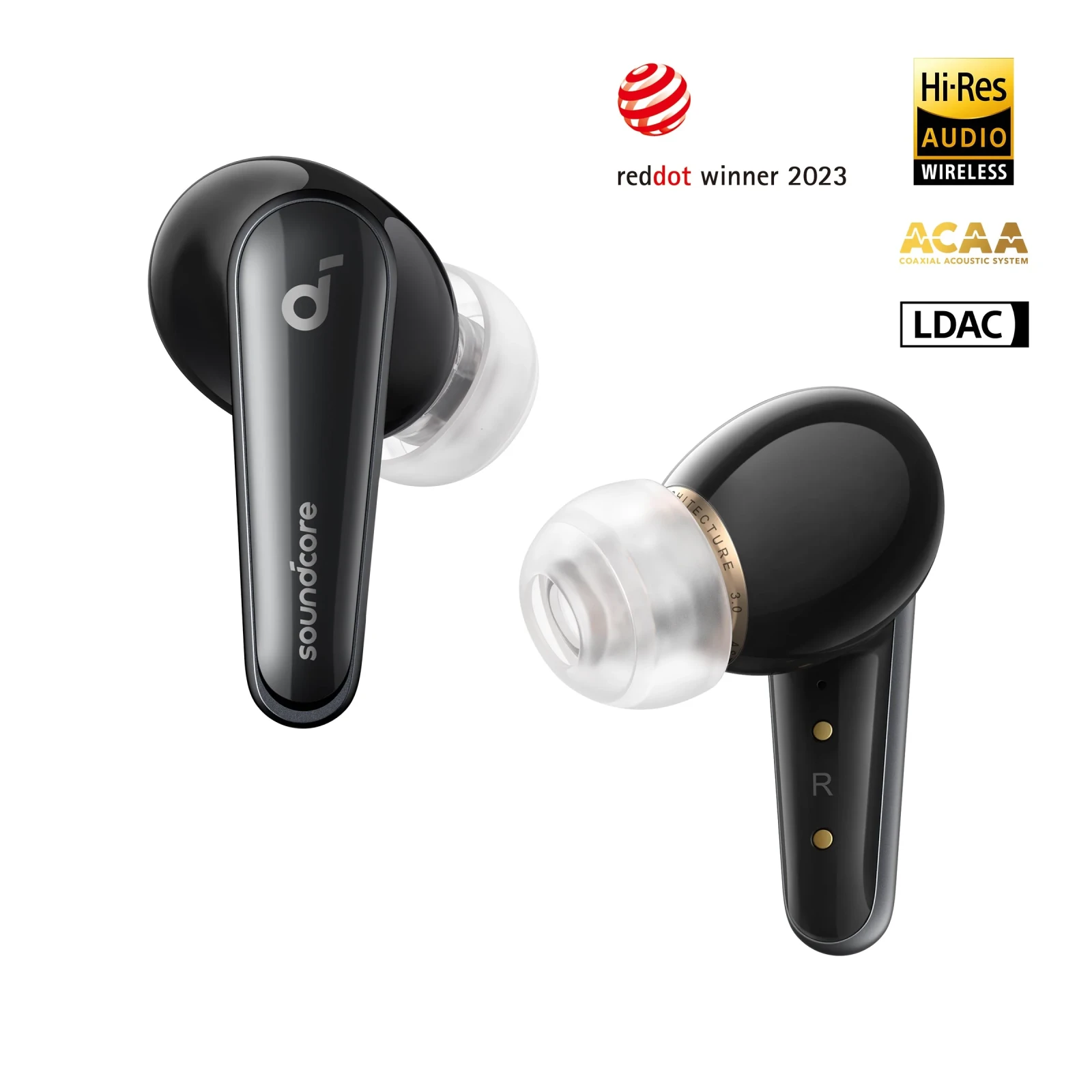
Fotoğraf: Anker
Shop Liberty 4 Midnight Black earbuds with ACAA™️ 3.0 audio, Spatial Audio, ANC, and heart rate tracking. Enjoy 9/28h playtime for music all day.
Products
Specs
Liberty 4 | High-Quality Sound True Wireless Earbuds
All-New True Wireless Earbuds with Premium Sound and Spatial Audio
9 reviews
Color
Midnight Black
Flexible installment payment options available.
Crisp, clear sound via ACAA™️ 3.0 Coaxial Acoustic System
360° immersive spatial audio with music and movie modes
CloudComfort™️ ear tips for long-lasting comfort
All-new heart rate sensor with soundcore app
HearID personalized active noise cancelling
9/28 hours of playtime for all-day listening
Note: For peak performance, please use the soundcore app and update to the latest firmware.
View More
Shipping Info
Shipping Policy
Standard Shipping
Place your order now for estimated delivery within 3-7 business days.
Free
Next-Day Shipping
Place your order now for estimated delivery within 1-2 business days.
$9.99
Members only
Express Shipping
Place your order now for estimated delivery within 1-3 business days.
$6.99
Members only
See available shipping areas
here
.
Express shipping is only available to registered users who are logged in.
Shipping Policy
Rules for Free Shipping Coupon:
1.While most orders are delivered within the estimated timeframe, certain factors may affect the delivery date.
2.Some items may be subject to shipping restrictions.
Additional Shipping Services
Next-Day Shipping Rates
Orders under 12 lb: $9.99
Orders over 12 lb: $14.99
Express Shipping Rates
Orders under 12 lb: $6.99
Orders over 12 lb: $9.99
Terms and Conditions
Services and benefits
Fast, Free Shipping
Hassle-Free Warranty
30-Day Money-Back Guarantee
Lifetime Customer Support
Want More Perks?
Become a Member Now!
1. Priority Shipping2. Member Pricing on Selected Products 3. Birthday Gift4. Unlock Benefits with soundcoreCredits
Learn More
30 Days Price Match
Payment Method
Delivery Method
Specs
Drivers
Dual Dynamic Drivers(9.2mm+6mm)
Playtime
9H/ 28H
Sound
ACAA 3.0: Dual Dynamic Drivers
Water Resistance
IPX4
Bluetooth Version
5.3
Active Noise Cancellation
Adaptive ANC
Fast Charging
15 Mins = 3 Hrs
Calls
6 mics with AI algorithm
Multipoint Connection
Yes
Customized EQ
HearID
Weight
5.6g (Without Case)
Special Features
Heart Rate Sensor
Design
In-Ear
Control
Earbud Stem Control
Liberty 4 | High-Quality Sound True Wireless Earbuds
*For coupon issues, please contact customer support. Sold Out Notify Me *For coupon issues, please contact customer support. Key Features Recommended By Hear the Unexpected Premium sound quality allows you to rediscover old favorites and create new musical memories. Hear the Unexpected Premium sound quality allows you to rediscover old favorites and create new musical memories. Crisp, Clear Sound Our upgraded ACAA 3.0 technology has two dynamic drivers to deliver crisp and clear sound. Crisp, Clear Sound Our upgraded ACAA 3.0 technology has two dynamic drivers to deliver crisp and clear sound. Outstanding Performance 2 dynamic drivers aligned on the same axis produce Hi-Res sound with 3× more clarity* in LDAC mode. Outstanding Performance 2 dynamic drivers aligned on the same axis produce Hi-Res sound with 3× more clarity* in LDAC mode. Hear Stunning Detail Hear every detail from the deep bass to the sparkling treble thanks to the wide frequency range. Hear Stunning Detail Hear every detail from the deep bass to the sparkling treble thanks to the wide frequency range. Hear the Unexpected Premium sound quality allows you to rediscover old favorites and create new musical memories. Hear the Unexpected Premium sound quality allows you to rediscover old favorites and create new musical memories. Crisp, Clear Sound Our upgraded ACAA 3.0 technology has two dynamic drivers to deliver crisp and clear sound. Crisp, Clear Sound Our upgraded ACAA 3.0 technology has two dynamic drivers to deliver crisp and clear sound. Outstanding Performance 2 dynamic drivers aligned on the same axis produce Hi-Res sound with 3× more clarity* in LDAC mode. Outstanding Performance 2 dynamic drivers aligned on the same axis produce Hi-Res sound with 3× more clarity* in LDAC mode. Hear Stunning Detail Hear every detail from the deep bass to the sparkling treble thanks to the wide frequency range. Hear Stunning Detail Hear every detail from the deep bass to the sparkling treble thanks to the wide frequency range. Hear the Unexpected Premium sound quality allows you to rediscover old favorites and create new musical memories. Hear the Unexpected Premium sound quality allows you to rediscover old favorites and create new musical memories. Dual Dynamic Drivers Advanced Acoustic System Premium Sound Quality In-Ear Studio Experience Sound That's Tuned to You Create your own HearID signature sound and use the customizable EQ settings for personalized sound. Sound That's Tuned to You Create your own HearID signature sound and use the customizable EQ settings for personalized sound. Immerse Yourself Feel like you're at the center of the sound with 360° Spatial Audio surrounding you from all directions. Immerse Yourself Feel like you're at the center of the sound with 360° Spatial Audio surrounding you from all directions. Sound That Follows You The built-in gyroscope detects every tiny movement so sound always surrounds you. Sound That Follows You The built-in gyroscope detects every tiny movement so sound always surrounds you. Music and Movie Modes The spatial audio algorithm tailors the sound to the content you're enjoying in music and movie modes. Music and Movie Modes The spatial audio algorithm tailors the sound to the content you're enjoying in music and movie modes. Sound That's Tuned to You Create your own HearID signature sound and use the customizable EQ settings for personalized sound. Sound That's Tuned to You Create your own HearID signature sound and use the customizable EQ settings for personalized sound. Immerse Yourself Feel like you're at the center of the sound with 360° Spatial Audio surrounding you from all directions. Immerse Yourself Feel like you're at the center of the sound with 360° Spatial Audio surrounding you from all directions. Sound That Follows You The built-in gyroscope detects every tiny movement so sound always surrounds you. Sound That Follows You The built-in gyroscope detects every tiny movement so sound always surrounds you. Music and Movie Modes The spatial audio algorithm tailors the sound to the content you're enjoying in music and movie modes. Music and Movie Modes The spatial audio algorithm tailors the sound to the content you're enjoying in music and movie modes. Sound That's Tuned to You Create your own HearID signature sound and use the customizable EQ settings for personalized sound. Sound That's Tuned to You Create your own HearID signature sound and use the customizable EQ settings for personalized sound. 360° Spatial Audio Dynamic Head Tracking Dual Modes Personalized Sound Squeeze Control Easily trigger playback functions with Squeeze Control. Customize via the soundcore app. Squeeze Control Easily trigger playback functions with Squeeze Control. Customize via the soundcore app. Cloud-Like Comfort The flexible dual-layer structure relieves pressure on your ear canals for all-day comfort. Cloud-Like Comfort The flexible dual-layer structure relieves pressure on your ear canals for all-day comfort. In Tune with Your Heart An in-ear heart rate sensor detects your heart rate while you listen throughout the day. In Tune with Your Heart An in-ear heart rate sensor detects your heart rate while you listen throughout the day. Adjusts to Noise Levels HearID ANC automatically adjusts the noise cancelling for different noise levels around you. Adjusts to Noise Levels HearID ANC automatically adjusts the noise cancelling for different noise levels around you. Squeeze Control Easily trigger playback functions with Squeeze Control. Customize via the soundcore app. Squeeze Control Easily trigger playback functions with Squeeze Control. Customize via the soundcore app. Cloud-Like Comfort The flexible dual-layer structure relieves pressure on your ear canals for all-day comfort. Cloud-Like Comfort The flexible dual-layer structure relieves pressure on your ear canals for all-day comfort. In Tune with Your Heart An in-ear heart rate sensor detects your heart rate while you listen throughout the day. In Tune with Your Heart An in-ear heart rate sensor detects your heart rate while you listen throughout the day. Adjusts to Noise Levels HearID ANC automatically adjusts the noise cancelling for different noise levels around you. Adjusts to Noise Levels HearID ANC automatically adjusts the noise cancelling for different noise levels around you. Squeeze Control Easily trigger playback functions with Squeeze Control. Customize via the soundcore app. Squeeze Control Easily trigger playback functions with Squeeze Control. Customize via the soundcore app. CloudComfort Ear Tips Heart Rate Tracking Adaptive Noise Cancelling Easy Control Convenient Customization Access Transparency mode, customize squeeze control to suit your listening style, and enjoy calming white noise when you want to rest or concentrate on your tasks. Convenient Customization Access Transparency mode, customize squeeze control to suit your listening style, and enjoy calming white noise when you want to rest or concentrate on your tasks. A Soundtrack for Your Day Recharge Liberty 4's case with a wireless charger or USB-C cable. The earbuds' playtime is extended to up to 28 hours with the case and you can get up to 3 hours of listening from a 15-minute charge. A Soundtrack for Your Day Recharge Liberty 4's case with a wireless charger or USB-C cable. The earbuds' playtime is extended to up to 28 hours with the case and you can get up to 3 hours of listening from a 15-minute charge. Seamless Switching Connect Liberty 4 to your phone and laptop at the same time to switch between music, videos, calls, and more. Seamless Switching Connect Liberty 4 to your phone and laptop at the same time to switch between music, videos, calls, and more. Exceptional Call Clarity 6 microphones and a noise reduction algorithm filter out background noises and enhance your voice in real time so you can be heard clearly. Exceptional Call Clarity 6 microphones and a noise reduction algorithm filter out background noises and enhance your voice in real time so you can be heard clearly. Convenient Customization Access Transparency mode, customize squeeze control to suit your listening style, and enjoy calming white noise when you want to rest or concentrate on your tasks. Convenient Customization Access Transparency mode, customize squeeze control to suit your listening style, and enjoy calming white noise when you want to rest or concentrate on your tasks. A Soundtrack for Your Day Recharge Liberty 4's case with a wireless charger or USB-C cable. The earbuds' playtime is extended to up to 28 hours with the case and you can get up to 3 hours of listening from a 15-minute charge. A Soundtrack for Your Day Recharge Liberty 4's case with a wireless charger or USB-C cable. The earbuds' playtime is extended to up to 28 hours with the case and you can get up to 3 hours of listening from a 15-minute charge. Seamless Switching Connect Liberty 4 to your phone and laptop at the same time to switch between music, videos, calls, and more. Seamless Switching Connect Liberty 4 to your phone and laptop at the same time to switch between music, videos, calls, and more. Exceptional Call Clarity 6 microphones and a noise reduction algorithm filter out background noises and enhance your voice in real time so you can be heard clearly. Exceptional Call Clarity 6 microphones and a noise reduction algorithm filter out background noises and enhance your voice in real time so you can be heard clearly. Convenient Customization Access Transparency mode, customize squeeze control to suit your listening style, and enjoy calming white noise when you want to rest or concentrate on your tasks. Convenient Customization Access Transparency mode, customize squeeze control to suit your listening style, and enjoy calming white noise when you want to rest or concentrate on your tasks. FAQ How-To Videos How to wear Liberty 4 and change eartips? How to use squeeze control on Liberty 4? How to use Spatial Audio with Liberty 4? How to use Liberty 4 Wellness features? How to re-pair and reset Liberty 4? Wearing How do I wear Liberty 4 correctly? -Liberty 4 comes with 4 sizes of ear wings and ear tips in S, M, M2, L. M2 is longer than the standard M size and fits deeper in your ear canal. Choose a size that fits your ears best. - Ensure you are wearing the left and right earbuds on the correct side. - If you're still not sure about the fit, take the Fit Test in the soundcore app. Can I use other third-party ear tips with Liberty 4? No. Due to the heart rate tracking related function, the ear tips need to be transparent. Changing to third-party ear tips will affect the heart rate function. If necessary, please contact our customer support team for replacement ear tips. How do I use squeeze control? 1. Ensure you are wearing the earbuds correctly and they have detected that you are wearing them. 2. Pinch the lower end of the earphone handle (at the groove) with two fingers. You'll hear a "click" sound to signify that the operation was successful. 3.You can customize the controls and the squeeze force in the soundcore app. Operation How do I turn the earbuds on and off? Turn On: Slide up to open the charging case to automatically turn on Liberty 4. Turn Off: - Put the earbuds back into the charging case. The earbuds will disconnect after 10 seconds. - The earbuds will also turn off automatically when the earbuds are outside the case, not being worn, and have been disconnected from your device for 30 minutes. (The auto power off time can be customized in the soundcore app.) - When you are wearing the earbuds, they will only turn off when the battery runs out. How can I adjust Liberty 4's volume via the earbuds? You can customize the controls according to your preferences via the app. 1. Go to the App Store or Google Play to download the soundcore app. 2. Pair your device with Liberty 4. 3. Open the soundcore app to connect with Liberty 4. 4. Select "Controls." 5. Customize the controls according to your preferences. Note: Customized controls are not available when using a single earbud. How do I switch to the next track/previous track? By default, triple-press the right earbud to go to the next track, and triple-press the left earbud to go to the previous track. You can customize the controls according to your preferences via the app. 1. Go to the App Store or Google Play to download the soundcore app. 2. Pair your device with Liberty 4. 3. Open the soundcore app to connect with Liberty 4. 4. Select "Controls." 5. Customize the controls according to your preferences. How do I play/pause audio? By default, press either earphone to play/pause audio. You can customize the controls according to your preferences via the app. 1. Go to the App Store or Google Play to download the soundcore app. 2. Pair your device with Liberty 4. 3. Open the soundcore app to connect with Liberty 4. 4. Select "Controls." 5. Customize the controls according to your preferences. Note: The music will automatically pause if you remove the earbuds. To start playing again, wear the earbuds. Can I use the left or right earbud on its own? Yes, remove one earbud from the charging case to use. If you are using two earbuds, you can put the earbud you don't want to use into the charging case and continue using the other one on its own. Note: If you are wearing two earbuds and listening in ANC mode, it will automatically switch to Normal mode when you return one earbud to the charging case. You can customize the settings in the app if you want to use ANC mode when using one earbud. If you wear the second earbud again, Normal mode will automatically switch back to ANC mode. How do I trigger my phone's voice assistant via Liberty 4? Go to Settings > Controls in the soundcore app and choose a custom command for voice assistants. How do I switch between ANC and Transparency modes? Double-press the pressure-sensitive button on the left or right earbud until you hear a "click" sound. You can add Normal mode as a custom command via the app. Bluetooth How do I reset my Liberty 4? Place the earbuds in the charging case and leave the case open, then press and hold the button on the case for 10 seconds until the LED indicators flash white rapidly three times. What should I do if any of the following problems occur? - Only one earbud has sound. - One side does not pair with the other side or my device. - No music plays after connecting with my device. - Cannot pair or reconnect with my device. Put the earbuds into the charging case and close for 10 seconds, then open the charging case to try pairing again. If that doesn't work, try the following: 1) Forget the Bluetooth pairing record on your device if you have previously connected the earbuds. 2) Place the earbuds in the charging case and leave the cover open. 3) Press the reset button for 3s, the light inside the case will flash once per second, then re-pair with the device. After paring successfully, the light inside the case will stay on for 1s, then breathe in and out over 4 seconds. If you want to connect to a new device, you need to long press and hold the reset button for 10s until you see the light effects inside the case. 4) Turn off your device's Bluetooth and turn it on again to pair with "soundcore Liberty 4". What should I do if Liberty 4 disconnects or the sound is choppy? Some environments (such as airports, offices, subways, crowded public spaces, etc.) can interfere with your Bluetooth connection. To optimize your Bluetooth connection: 1. Download videos and songs instead of streaming, as it may be related to the network environment. 2. If you have an Android phone, temporarily disable unnecessary app traffic settings on your phone. Or you can try: - Resetting the earbuds. See "How do I reset Liberty 4?" - Try a different device if possible. How do I enable dual connections on Liberty 4? The earbuds can connect with two devices at the same time so you can switch between them effortlessly. To pair with another device, go to Settings > Dual Connections > Connect New Device. Charging Does the case support wireless charging? Yes, place the case on the wireless charging pad and make sure it's closed and centrally aligned. What is Liberty 4's playtime from a single charge? Normal Mode: Up to 9 hours on a single charge/28 hours with the charging case. Noise Cancelling Mode: Up to 7 hours on a single charge/24 hours with charging case. Transparency Mode: Up to 7 hours on a single charge/24 hours with charging case. Call: Up to 5 hours on a single charge/15 hours with charging case. What should I do if any of the following problems occur? - The earbuds don’t recharge in the charging case. - The earbuds keep connecting to the device even after being put back in the charging case with the cover closed. - The earbuds don't turn on when taken out of the charging case. 1. Confirm the charging case has power left. 2. Clean the charging pins with a dry cloth and rubbing alcohol to ensure all charging pins on the earbuds and charging case are completely clean and dry of sweat and water. Then put the earbuds into the case. 3. Make sure the earbuds are in place. The LED light will breathe in and out to indicate that the earbuds are charging. How long does it take to fully charge the earbuds? 1 hour. How long does it take to fully charge the charging case? 2 hours. Sound What audio codecs do Liberty 4 support? SBC, AAC, and LDAC. What should I do if Liberty 4's noise cancellation performance does not meet my expectations? Here are some tips for enhancing the sound quality and noise cancellation: 1) Try other sizes of ear tips to ensure you're using one that fits well and creates a tight seal. 2) Make sure you're wearing the earbuds in the correct position so that they create a tight seal. To check if you're wearing the earbuds in the perfect position, take the Fit Test on the soundcore app. 3) Take the HearID ANC test to personalize the noise cancelling effect. 4) Try different ANC modes to see which one suits your environment best. Note: In a noisy environment and at high volume, you may feel that the noise cancellation performance is not as strong. How do I enable LDAC? 1. Download and update your soundcore app to latest version. 2. Change the sound mode to "Preferred Audio Quality" and follow the instructions to update to the latest firmware version. The LDAC codec is now enabled and will work with your LDAC compatible device. Note: The LDAC codec processing will increase the power consumption and decrease the overall playtime. Only devices with Android 8.0 or later support LDAC. LDAC is restricted by Bluetooth bandwidth and is not supported when using multipoint connection. What should I do if the left and right earbuds are in different modes? For example one is in Normal mode and the other is in ANC or Transparency mode. 1. Put the earbuds back into the charging case at the same time, then close the charging case for at least 3 seconds and wear them again. 2. Reset the earbuds, see "How do I reset Liberty 4? Spatial sound How do I enable Spatial Audio? 1. Wear the earbuds. 2. Enter the soundcore app and connect Liberty 4. 3. Select Spatial Audio. 4. Spatial Audio cannot be turned on while sound effects are turned on. 5. Select Movie or Music mode to adjust the sense of distance while listening to different types of audio content. APP - soundcore Wellness How do I use soundcore Wellness? 1. Select soundcore Wellness in the soundcore app. 2. The information settings will pop up automatically when you enter soundcore Wellness for the first time. In order to get the most out of soundcore Wellness, add your personal information. Note: Your information is for your personal use only. 3. Select the person icon on the top right of the screen to set or change information if needed. Why is my heart rate is always calibrating? 1. Once you remove Liberty 4 from the charging case, automatic calibration is needed in order to ensure the accuracy of the heart rate sensor. 2. You can toggle manual calibration in the app if you prefer. What should I do if there is no test data when I wear a single earbud only? The heart rate sensor is built into the right earbud, so it only works when you wear the right earbud. Is the sensor harmful to my body? The heart rate sensor detects the flow of blood in the subcutaneous blood vessels through an optical sensor, and it does so without causing damage to your body. What does the red light on the right earbud mean? When measuring blood oxygen, the right ear headset will light up red. Can I measure heart rate and stress without using the soundcore app? You need to wear your Liberty 4 and keep the soundcore app open to measure your heart rate and stress changes while using the earbuds. Why is my stress level constantly being detected? After activating the app, when you wear Liberty 4 and the App is running, your stress will be automatically detected, so you can check it at any time. In the stress detection part of the app, you can turn off the real-time stress detection if you want. Why is my heart rate being monitored constantly? After activating soundcore Wellness, your heart rate will be automatically detected when you wear Liberty 4 and the app is running, so you can check it at any time. You can choose to turn off real-time heart rate detection via the heart rate display. This will stop continuous monitoring of your heart rate. Why is the heart rate test value from Liberty 4 different from the value on my other heart rate monitoring devices? soundcore Liberty 4 earbuds and the associated soundcore app are not intended for medical purposes, including self-diagnosis and medical consultation, and is suitable for general fitness and wellness use only. Documents & Drivers How to wear Liberty 4 and change eartips? How to use squeeze control on Liberty 4? How to use Spatial Audio with Liberty 4? How to use Liberty 4 Wellness features? How to re-pair and reset Liberty 4? Specs DriversDual Dynamic Drivers(9.2mm+6mm) Playtime9H/ 28H SoundACAA 3.0: Dual Dynamic Drivers Water ResistanceIPX4 Bluetooth Version5.3 Active Noise CancellationAdaptive ANC Fast Charging15 Mins = 3 Hrs Calls6 mics with AI algorithm Multipoint ConnectionYes Customized EQHearID Weight5.6g (Without Case) Special FeaturesHeart Rate Sensor DesignIn-Ear ControlEarbud Stem Control Customer Reviews Based on 9 reviews Write a review 56% (5) 11% (1) 11% (1) 11% (1) 11% (1) C C. Liberty 4 One of the best earbuds, high quality sound system, clarity is 100%, call quality 100%, bass 85% Love this J J.P. Improved voice during phone call with iPhone 15 Pro Max I was receiving complaints on call quality when using Apple AirPods Pro (1st Generation) with iPhone 15 Pro Max. Switched to these for phone calls and immediately received compliments only a greatly improved voice quality. V V.C.L. Calidad Excelente sonidoExcelente productoRecomendable J J.M. Battery I’ve charged these earbuds once and I’ve had them for 7 months and used them in multiple 3-10 hour car rides for the whole time. They are also very comfortable with good sound quality. A A.R. The best sounding earbuds from Soundcore (for now) Sound clarity: 10Bass: 10Call quality: 9Fit and comfort: 8.5Battery life: 9Volume: 9Overall score: 92.5 1 2
Metin ve görseller üreticinin sitesinden birebir · Anker'daki ürün sayfası: https://www.soundcore.com/products/liberty-4-a3953z11
Anker markasının bu kategoride fiyatı listelenen 45 modeli var; kategorideki fiyatlı modellerin %3'ü bu markanın.
Özellikçe en yakın modeller: Philips SHE3595, Philips SHE3205 ve Rampage SN-R99 Elity.
Üretici bölümlerindeki metin ve görseller Anker markasına aittir; değiştirilmeden, kaynağı gösterilerek yayınlanır. Fiyatlar mağazalardan günlük toplanır; satın almadan önce satıcı sitesinde kontrol edin.